
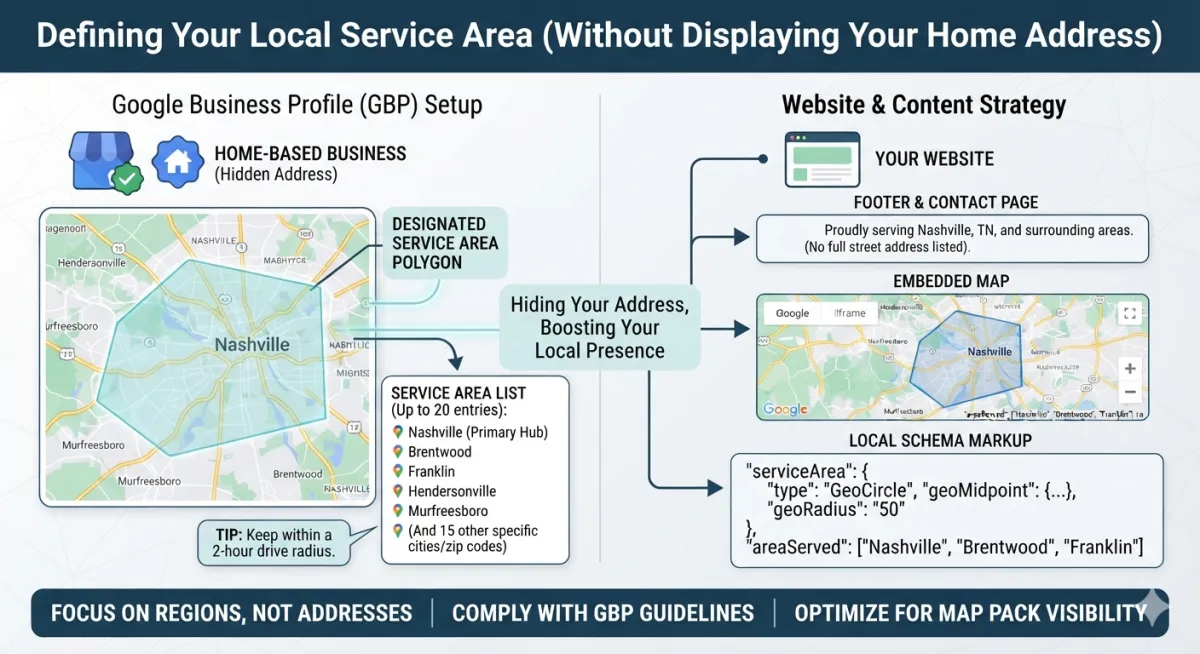
Hiding Your Home Address
For home-based business owners, hiding your home address while maintaining strong local SEO is completely doable. Google explicitly designs features for this business model.
1. Set Up a Google Business Profile (GBP) as a Service-Area Business
Google allows you to create a Service-Area Business (SAB) profile. This hides your physical address from the public map while still showing your business in local search results.
During Setup: Enter your home address for Google's verification purposes (required and will remain hidden).
Toggle Address Off: In the location settings, clear your address and select "No, I don't have a physical location" if prompted.
Define Your Service Area: Select the specific cities, postal codes, or counties you serve. Keep this radius under a 2-hour drive time to avoid triggering Google's spam filters.
2. Handle Address Visibility on Your Website
You do not need to list a full street address on your website to rank locally. Instead, use localized geographic signals.
Footer and Contact Page: Replace your street address with text like "Proudly serving Nashville, TN and surrounding areas."
Embed a Custom Map: Instead of embedding a map pointing to a specific house, embed a Google Map that highlights your entire service area polygon or city center.
3. Implement Local Schema Markup
You can use Schema structured data code on your website to tell search engines where you operate without showing a street address to human visitors.
Use the
ServiceAreaorAreaServedproperty within yourLocalBusinessschema.Define your service area by specifying geographic regions, cities, or states using GeoJSON or Wikipedia/Wikidata links.
4. Build Citations Without a Public Address
Standard business directories (Yelp, YellowPages) often require an address, but you can adapt your strategy.
Hidden Address Directories: Use platforms like Yelp that allow you to hide your street address and display only a city and state.
Hyper-Local Link Building: Focus on getting links from local blogs, charities, or chamber of commerce websites. These links provide local relevance without needing a matching NAP (Name, Address, Phone) string.
5. Never Use a P.O. Box or UPS Store Address
Using a P.O. Box, UPS Store, or virtual office address to trick Google into thinking you have a commercial location is a severe violation of Google’s guidelines. Doing this will result in an immediate profile suspension. Google requires a physical address where your business actually operates or can be reached.

